Beautify Script: The Handmade Touch for Modern Creators
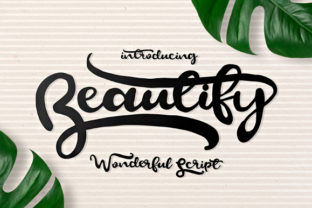
There is a specific feeling you get when you see something handwritten. It feels personal, authentic, and warm in a way that rigid, mass-produced typefaces often struggle to achieve. This is exactly where Beautify Script steps in. It is not just another font file sitting in your library; it is a gorgeous flowing script designed to bring that same handmade charm to your digital and print projects without the mess of actual ink.
Whether you are a small business owner trying to make your brand feel more approachable or a blogger looking to add a touch of elegance to your headers, this font offers a versatile solution. It features a full character set alongside international characters and alternates, giving you the freedom to create beautiful typographic pieces that look as if they were crafted by hand.
Why Choose a Flowing Script for Your Projects?
In a world dominated by clean sans-serifs and corporate block letters, standing out often requires a different approach. People are tired of seeing the same generic templates everywhere. When you use Beautify Script, you are immediately signaling that care was taken with the details. It breaks the monotony of standard design and invites the viewer to slow down and read.
The "flowing" nature of this script is its greatest asset. Unlike some decorative fonts that can be hard to read, Beautify Script maintains legibility while offering artistic flair. The curves connect naturally, mimicking the motion of a pen gliding across paper. This makes it perfect for situations where you want to convey emotion, creativity, or sophistication.
Real-World Scenarios for Beautify Script
Let's move beyond abstract concepts and look at how this tool actually fits into daily workflows. You don't need to be a professional graphic designer to leverage the power of this font effectively.
- The Entrepreneur Launching a Brand: Imagine you are opening a boutique coffee shop or a handmade jewelry store. Your logo needs to feel artisanal. Using Beautify Script for your signage or packaging creates an immediate connection with customers who value craftsmanship. It tells them, "We made this with our own hands."
- The Freelance Content Creator: If you run a lifestyle blog or a YouTube channel focused on home decor, your thumbnails and title cards need to pop. A standard font might get lost in the feed. Adding a header in Beautify Script adds a layer of polish that elevates the perceived quality of your content instantly.
- The Educator or Teacher: Creating worksheets, certificates, or classroom decorations? Standard fonts can feel sterile. Using this script for student awards or special event invitations adds a celebratory and personal touch that students and parents appreciate.
- The Wedding Planner or Event Coordinator: Invitations are perhaps the most common use case for script fonts. However, many scripts are too messy to be readable. Beautify Script strikes a balance, allowing you to write names and dates clearly while maintaining a romantic, elegant aesthetic.
Unlocking the Power of Alternates and International Characters
One of the most practical features of Beautify Script is the inclusion of alternates. In typography, an alternate is a different version of a letter that serves the same function but looks slightly different. Why does this matter?
When you type a word like "hello," every letter connects to the next. Sometimes, having the exact same connection style repeated throughout a sentence can look repetitive or robotic. By utilizing the alternates available in Beautify Script, you can vary the starting strokes of letters. This creates a more organic, fluid appearance, making the text look even more like it was written with a calligraphy brush rather than typed on a keyboard.
Furthermore, the support for international characters is a crucial consideration for modern creators. If you are marketing to a global audience or creating content for diverse communities, you cannot afford to have missing accents or strange symbols replacing your letters. With a full character set that includes these international glyphs, you can confidently use Beautify Script for projects targeting audiences in Europe, South America, and beyond without worrying about broken text.
Digital vs. Print: Where Does It Shine?
You might wonder if a script font works well on screens, given that low-resolution displays can sometimes blur delicate lines. The answer is yes, provided you use it correctly. Because Beautify Script is designed with a flowing structure, it scales well from large web headers down to smaller social media graphics.
For digital use, consider using it sparingly. Use it for headlines, pull quotes, or button labels where you want to draw attention. Do not use it for long paragraphs of body text, as the cursive nature can reduce readability over extended periods. Instead, pair it with a clean, simple sans-serif font for the main content. This contrast ensures your message is clear while still benefiting from the aesthetic appeal of the script.
In the print world, the possibilities expand. From wedding stationery and greeting cards to book covers and product labels, the texture of the font translates beautifully onto paper. The "handmade look" is particularly effective for physical goods, adding a sense of luxury and exclusivity that consumers are willing to pay a premium for.
Practical Tips for Getting Started
If you are ready to download and apply Beautify Script to your next project, keep a few practical considerations in mind to ensure the best results.
- Readability First: Always test your design at the size it will be viewed. What looks beautiful on a high-resolution monitor might become illegible on a mobile screen or a small business card. If the connections between letters become too tangled, switch to a simpler font or reduce the font size.
- Pairing Matters: Never let Beautify Script fight for attention with other decorative fonts. It works best when paired with neutral, understated typefaces. Think of it as the star of the show; the supporting cast should remain quiet so the script can shine.
- Check Your Licensing: Before buying or downloading, always review the license agreement. Some fonts are free for personal use only, while others require a commercial license for business projects. Ensuring you have the correct rights protects you from legal issues later on.
- Embrace the Alternates: Don't just type the word and leave it. Take the time to manually swap in alternates for key words. This extra step transforms a standard text box into a piece of custom art.
Making Your Work Stand Out Authentically
Ultimately, the goal of using Beautify Script is to communicate a message with personality. In a crowded marketplace, authenticity is a rare commodity. People crave genuine connections, and typography is one of the fastest ways to establish that tone.
Whether you are crafting a heartfelt invitation, designing a logo for a new startup, or simply sprucing up a presentation for a client meeting, this font provides the tools you need to elevate your work. It bridges the gap between the digital and the analog, offering the precision of technology with the warmth of human touch.
By understanding where and how to apply this resource, you can turn ordinary designs into memorable experiences. So, the next time you sit down to create something new, remember that a little bit of flow can go a long way in beautifying your script and your story.