Chadina Script: A Timeless Blend of Elegance and Modern Calligraphy
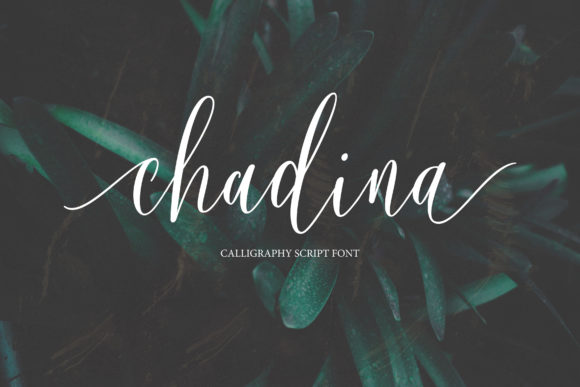
Chadina Script is a stunning font that effortlessly marries the timeless charm of classic script with the fluidity of modern calligraphy. Its smooth, stylish characters create a natural and authentic look, making it an excellent choice for a wide range of creative projects. Whether you're designing a wedding invitation, crafting a logo, or personalizing a t-shirt, Chadina Script adds a touch of sophistication and romance to your work.
Designed with elegance in mind, this font features graceful curves and elegant flourishes that give it a unique personality. It’s not just a font—it's an artistic expression that can elevate any design from ordinary to extraordinary.
Why Choose Chadina Script?
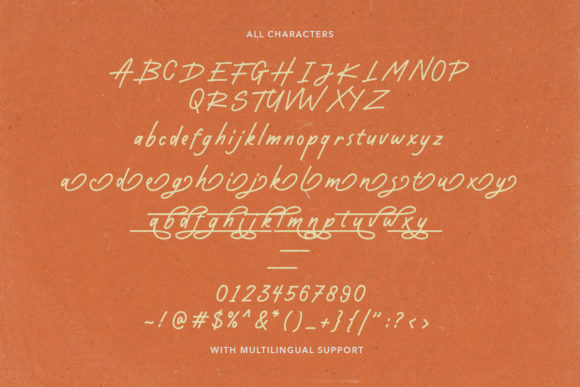
Chadina Script stands out due to its versatility and aesthetic appeal. It's ideal for use in titles, signatures, logos, wedding invitations, letterheads, nameplates, labels, bulletins, posters, and badges. Its PUA (Private Use Area) encoding ensures that all glyphs and swashes are easily accessible, allowing designers to customize their text with ease.
For professionals and creatives, this font offers a seamless blend of form and function. Its clean lines and refined style make it suitable for both digital and print media, ensuring that your message is always presented beautifully.
Common Mistakes When Using Chadina Script
While Chadina Script is a powerful tool, there are common pitfalls that users often encounter. One frequent mistake is using the font inappropriately. For example, applying it to long paragraphs or body text can make reading difficult. The intricate details of the script may become overwhelming, reducing readability and effectiveness.
Another common error is neglecting to check the font’s compatibility with different platforms. Some design software may not support PUA-encoded fonts properly, leading to unexpected results when exporting or sharing your work. Always verify that your chosen platform supports Chadina Script before finalizing your project.
Many users also overlook the importance of spacing and kerning. Because of its flowing nature, proper spacing between letters and words is crucial. Incorrect spacing can distort the font’s appearance, making it look cluttered or unprofessional.
How to Avoid These Mistakes
To ensure that Chadina Script looks its best, consider using it primarily for headings, titles, and short phrases rather than lengthy text. This approach maintains clarity while still showcasing the font’s beauty.
Before starting your design, test the font across multiple devices and software applications. This step helps identify any potential issues with rendering or compatibility. If possible, preview your design on both screen and print to ensure consistency.
Use built-in tools within your design software to adjust spacing and kerning. Many programs offer advanced typography settings that allow you to fine-tune the appearance of your text. Taking the time to adjust these settings can significantly enhance the overall look of your design.
What to Check Before Using Chadina Script
Before incorporating Chadina Script into your project, take a moment to evaluate a few key factors. First, ensure that the font is legally licensed for your intended use. Some fonts come with restrictions, especially if you plan to use them commercially.
Next, consider the context of your project. Will the font complement the overall design theme? Does it align with the tone and message you want to convey? Choosing the right font is essential for creating a cohesive and impactful design.
Finally, review the font’s documentation to understand its full capabilities. Knowing which glyphs and swashes are available can help you make the most of the font’s features. Experiment with different combinations to discover how they can enhance your work.
Realistic Examples and Better Approaches
Imagine designing a wedding invitation using Chadina Script. Instead of covering the entire card with the font, use it for the main title and signature. Pair it with a simpler sans-serif font for the body text to maintain readability while adding a romantic touch.
If you’re creating a logo, start by sketching a rough layout. Consider how the script will interact with other elements such as colors, shapes, and images. Testing different layouts can help you find the perfect balance between aesthetics and functionality.
For a t-shirt design, focus on the placement of the text. Chadina Script works well as a central feature, but avoid overcomplicating the design with too many elements. Keep the focus on the font itself to highlight its elegance.
Final Thoughts on Chadina Script
Chadina Script is more than just a font—it’s a creative tool that can transform your designs. By understanding its strengths and limitations, you can use it effectively to achieve professional and visually appealing results.
Whether you're a designer, marketer, blogger, or hobbyist, Chadina Script offers endless possibilities. With careful planning and attention to detail, you can harness its beauty to create stunning visuals that leave a lasting impression.
Take the time to explore the font’s features, test it in various contexts, and apply it thoughtfully. Doing so will help you avoid common mistakes and ensure that your designs stand out in a crowd.